1
/
من
3
Xbloom
منظم ضغط داخلي - xBloom
منظم ضغط داخلي - xBloom
السعر الاعتيادي
Dhs. 290.00 AED
السعر الاعتيادي
سعر البيع
Dhs. 290.00 AED
الضرائب مشمولة.
الكمية
تعذّر تحميل توفر الاستلام
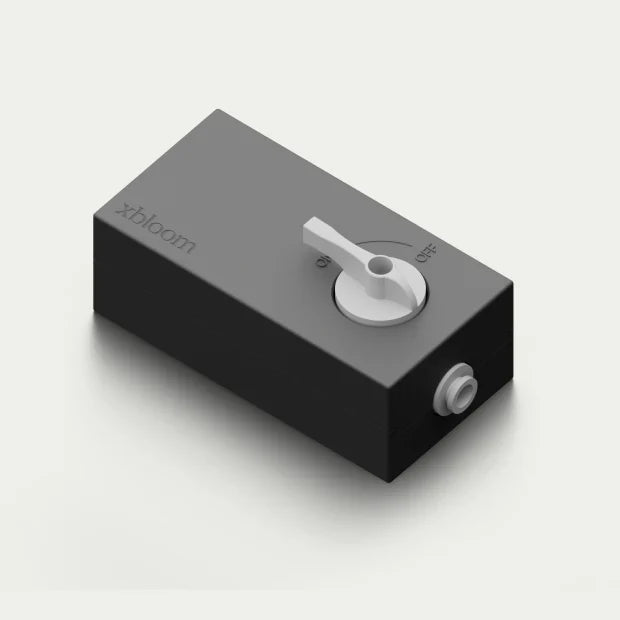
منظم الضغط المدمج xBloom
يعد منظم الضغط المدمج xBloom ملحق سباكة بالغ الأهمية ومصمم خصيصًا لـ xBloom Studio. يتيح للمستخدمين الانتقال من خزان المياه الذي يتم تعبئته يدويًا إلى وصلة خط مياه مباشر، مما يوفر إمدادًا مستمرًا بالمياه مع حماية المكونات الداخلية للجهاز من أنظمة السباكة عالية الضغط.
الميزات الرئيسية
- إمكانية التوصيل المباشر بالسباكة: يتيح توصيلًا دائمًا بخطوط المياه المنزلية أو أنظمة الترشيح تحت المغسلة، مما يلغي الحاجة إلى إعادة تعبئة خزان المياه يدويًا.
- تثبيت الضغط: مصمم خصيصًا لخفض ضغط المياه السكني المرتفع إلى مستوى آمن ومتسق لمضخة الجهاز.
- موصلات التوصيل والتشغيل: يتميز بتجهيزات توصيل سريعة وأكواع جذعية لضمان إعداد مانع للتسرب دون الحاجة إلى أدوات سباكة متخصصة.
- التكامل البرمجي: يعمل جنبًا إلى جنب مع وضع "مدخل المياه" في xBloom Studio، والذي يمكن تبديله عبر واجهة الجهاز لتجاوز مستشعرات الخزان.
المواصفات الفنية
- التوافق: حصريًا لـ xBloom Studio.
- الحد الأقصى لضغط الدخل: حتى 170 رطل لكل بوصة مربعة (11.7 بار).
- أنابيب الإخراج: أنابيب قياسية بقطر 1/4 بوصة من الدرجة الغذائية.
-
معايير السلامة: مواد من الدرجة الغذائية مناسبة لمياه الشرب.
الأداء ومراجعات الخبراء
- كفاءة سير العمل: يلاحظ المستخدمون الأوائل والمراجعون على منصات مثل Home-Barista أن "توصيل" Studio بالسباكة يحسن بشكل كبير سير العمل للمستخدمين المنزليين ذوي الاستخدام العالي، حيث يزيل وقت التوقف المرتبط بإعادة تعبئة الخزان.
- اتساق الضغط: أفاد المستخدمون أن المنظم يمنع بنجاح تأثير "الضرب" الذي يُرى أحيانًا في آلات الإسبريسو ذات الخط المباشر، مما يضمن بقاء مقياس التدفق الداخلي لـ xBloom دقيقًا.
- سهولة الإعداد: تسلط التعليقات الضوء على أنه بينما يكون التثبيت المادي بسيطًا، يجب على المستخدمين تذكر تبديل وضع برنامج الجهاز يدويًا (عن طريق الضغط على المقبض الأيمن لمدة 3 ثوانٍ) للتعرف على مصدر المياه الخارجي.
مشاركة